Pumply - Pumplog Tracker
Northlight StudioParenting
4.7334.00 Reviews
- Version
- 5.6
- Installs
- 50.00K
- Age Rating
- Everyone
Screenshots
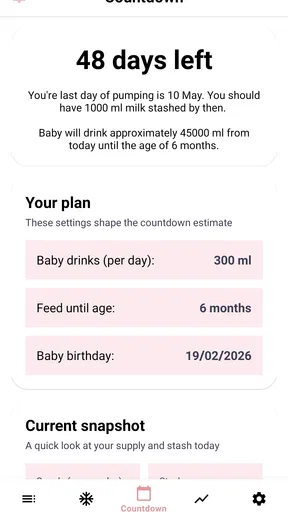
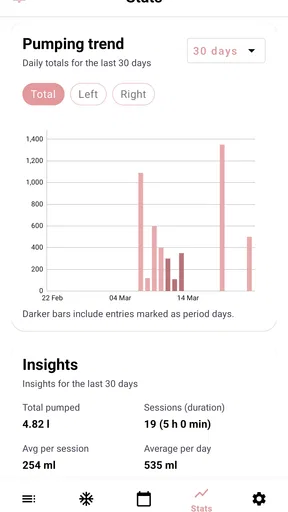
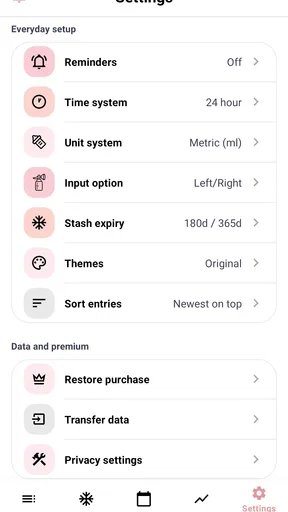
Our Review of Pumply - Pumplog Tracker
 Analysis by Appyee
Exclusive pumping can turn an ordinary day into a string of small decisions: when to pump, how much was collected, which side was used, and whether the totals are moving in the direction you hoped. Pumply - Pumplog Tracker focuses on one useful job: giving those sessions a clear place to record. After using it as a parenting app, I found its value less in flashy extras and more in reducing the mental effort of remembering what happened during a tiring day.
That narrow focus matters. A general notes app can hold the same information, but it leaves you building your own format every time. A paper notebook is flexible, yet easy to misplace and awkward when you want to understand a pattern. Pumply is designed around pumping records, so the information is easier to enter and easier to review as a running history. For parents who are exclusively pumping, that can make an important daily routine feel more manageable.
Why session and volume tracking makes a difference
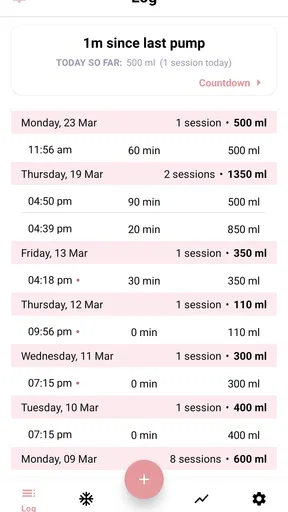
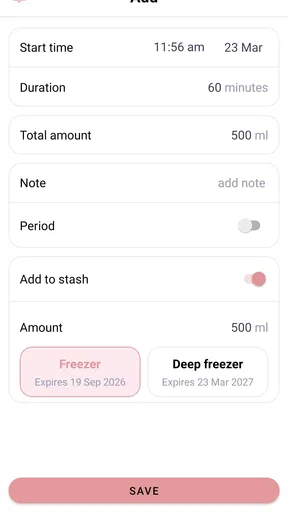
The central capability is session logging: recording pumping activity, the volume collected, and the totals that build throughout the day. This sounds simple, but the practical effect is significant. Instead of relying on memory after waking from a short sleep or moving between childcare tasks, I can treat each session as a small completed entry. The app then becomes an external memory for a routine that is repetitive but still easy to lose track of.
I especially like this approach for parents who want to see the difference between one session and the broader daily picture. A single lower-volume session can feel worrying when viewed in isolation. A running total gives it context. Likewise, a productive session may feel reassuring, but the total is more useful than the emotional impression of that one moment. The app encourages a calmer reading of the day because it places individual entries alongside accumulation.
This is not the same as medical guidance, and I would not use a tracking total as a substitute for advice from a lactation consultant, midwife, doctor, or pediatric professional. Its role is practical record keeping. That distinction is important: the app can help me describe what has been happening, but it cannot explain every change or tell me what a particular volume means for my health or my baby.
The store summary presents the experience as a simple way to track sessions, volumes, and totals, and that description matches the app’s strongest purpose. It is not trying to become a broad family organizer. Instead, it keeps attention on the pumping routine itself. For a user who wants feeding timers, diaper records, sleep charts, medication reminders, and growth measurements in one place, a larger baby-care app may be a better fit. Pumply makes more sense when pumping is the record that needs the most attention.
Turning a tiring routine into a repeatable record
In practice, I would use the app immediately after finishing a session rather than waiting until the end of the day. That small habit avoids the most common tracking problem: trying to reconstruct several sessions from memory. When I log close to the event, the entry has a clear place in the day, and the total remains more trustworthy. If I wait, a late-night session can easily blur into the next morning.
A useful routine is to keep the phone nearby while setting up the pump, complete the session, and record the result before moving on to washing parts or settling the baby. The point is not to make every pumping session feel like paperwork. It is to attach a very short record to something that is already happening. The less I postpone it, the less likely I am to create gaps or duplicate entries.
Another practical tip is to decide in advance what level of precision is genuinely helpful. If recording every tiny detail makes the routine stressful, the app is more useful when I enter consistent information rather than chasing perfect records. A stable habit of logging comparable sessions can reveal more than a few highly detailed entries followed by several missed days.
The totals are also useful when planning the next part of the day. I can look at the accumulated amount and understand where I stand without adding figures manually. That is particularly helpful when tiredness makes mental arithmetic feel harder than it should. The benefit is not that the app changes the pumping process; it makes the information available at the moment I need it.
A realistic day with Pumply
Imagine a parent who is pumping before breakfast, again during a quiet midmorning window, and later while the baby naps. The first session is easy to remember because the day has just started. By the third, the details are less certain: was that the second session, or was there one during the night? Was the container from the earlier session already included in the running amount?
With Pumply, the parent can record each session as it happens and use the accumulated view instead of keeping the whole sequence in their head. If a partner asks how the day is going, the answer does not require searching through messages or a notebook. If the parent later wants to discuss the routine with a healthcare professional, a consistent record is more useful than a vague memory of “about three sessions.”
The same workflow helps during an irregular day. A visitor arrives, the baby sleeps at an unusual time, or an appointment interrupts the usual rhythm. The app cannot restore the lost routine, but it can preserve what actually happened. That is a subtle strength: tracking reality is often more useful than trying to make reality look perfectly scheduled.
I would also use the history as a reflection tool rather than checking it constantly. Looking at entries after several days can help identify when records become difficult to maintain, such as during travel, overnight care, or days with little support. The insight is not necessarily about increasing output. It may simply show that the tracking method needs to become quicker or that another person should help with the surrounding tasks.
Where it fits beside notebooks and broader baby apps
A notebook remains a good alternative for someone who wants complete freedom. You can write comments, draw a schedule, record pump settings, or combine feeding notes with everything else happening in the household. The trade-off is that totals require manual work, and a handwritten page does not offer the same focused structure as a purpose-built tracker.
A general baby-tracking app may be better for parents who want one timeline covering nursing, bottles, diapers, sleep, and pumping. That kind of all-in-one view can be valuable when several caregivers share responsibility or when the family wants to connect multiple routines. The downside is that the pumping record may become one small feature among many, and entering a simple session can feel slower or less focused.
Pumply sits between those choices. It is more structured than a blank note and more focused than a broad baby dashboard. I see that as its clearest identity. The app is most convincing when the main problem is remembering pumping sessions and volumes, not managing every part of infant care.
What I would watch before relying on it every day
The focused design can also feel limiting. If I want extensive context around a session, such as a detailed note about comfort, equipment, mood, or a baby’s feeding response, a simple tracker may not replace a fuller journal. Parents with complicated routines may need to keep another record alongside it, which reduces the convenience of having one source of truth.
There is also a discipline trade-off. Any tracker is only as useful as the entries it receives. During the first weeks after birth, sleep deprivation and constant interruptions can make even a quick log feel like another obligation. I would not judge myself for having incomplete records, and I would not let the app turn a flexible routine into a source of guilt. The best use is supportive: record what is practical, then use the information without treating every gap as a failure.
The app is free to start, while in-app purchases range from $5.99 to $24.99 per item. That makes it sensible to try the basic experience before deciding whether paid elements are worthwhile for your routine. I would pay only if the extra value clearly saves time or makes the records easier to maintain; a tracker that creates financial pressure defeats some of the calm it is meant to provide.
Compatibility is also straightforward for many users: the current version is 5.6 and it requires Android 8.0 or later. That is worth checking before planning to use it on an older phone. The age rating is Everyone, which fits a family-oriented record-keeping tool, though parents should still think about who can physically access the device and see personal logs.
Who will get the most from this focused approach
I would recommend Pumply first to someone who is exclusively pumping and wants a dedicated record without the clutter of a full parenting suite. It is also a good match for a parent who has tried paper notes but keeps forgetting to total the day, or for someone who wants a clearer record to discuss during a professional appointment. The app’s usefulness grows when the same person logs regularly and benefits from seeing sessions and volumes together.
It can also help a partner or support person understand the rhythm of the day. Instead of asking the pumping parent to remember every detail while already exhausted, a shared conversation can start from the recorded routine. I would still be careful about treating the app as a communication system unless everyone agrees on how entries should be interpreted. A number without context is not automatically a complete picture.
I would skip it if you want a complete newborn-care command center, detailed medical documentation, or a free-form journal. I would also choose a broader alternative if several caregivers need to coordinate many kinds of care in one place. Pumply’s strength is precisely its limited scope, so that same limitation becomes a poor fit for users whose needs extend far beyond pumping.
My overall experience with the app
Northlight Studio has kept the idea easy to understand: log the pumping event, record the volume, and use the totals to reduce guesswork. The app has a 4.7 average from around 1.7 thousand ratings, with more than 50 thousand installs, so it has found an audience among people looking for this specific kind of support. Those figures do not replace personal testing, but they do suggest that the focused concept resonates with many users.
What stayed with me is the way a small record can change the feeling of a busy day. Pumping itself remains demanding, and no tracker can remove the physical or emotional work involved. But having the session history in one place means I spend less energy reconstructing the past. That is a modest benefit, yet modest benefits are often the ones that matter during repetitive care routines.
My recommendation is to treat Pumply as a practical memory aid, not a judge of your performance. Use it right after sessions when possible, keep the recording habit simple, and review totals for context rather than pressure. If that matches what you need, this free parenting app is worth trying. If you need a complete care-management system or extensive notes around every event, another tool will probably serve you better.
For the right user, the app succeeds because it does not ask pumping records to compete with every other parenting task. It gives one demanding routine a dedicated home. I would recommend it to a friend who wants less mental arithmetic, fewer forgotten sessions, and a clearer view of the day, while being honest that its focused design will not satisfy everyone.
Verdict
Strengths of Pumply - Pumplog Tracker
- Quickly logs sets, reps, weight, and workout duration.
- Progress charts make strength gains easy to monitor.
- Exercise library helps organize routines for different goals.
- Simple interface keeps tracking focused during gym sessions.
- Useful reminders can encourage a more consistent training schedule.
Limitations of Pumply - Pumplog Tracker
- Some features may require a premium subscription.
- The exercise database may not cover every specialized movement.
- Manual logging can feel repetitive during high-volume workouts.
- Limited social features for sharing progress with training partners.
- Battery use may increase if workout timers or notifications stay active.
Similar Picks in This Category
View All
Family Space
Motorola Mobility LLC.3.9

شرطة الأطفال - مكالمة وهمية
Oub Apps4.1

Findmykids: Parental Control
LETEM LTD4.6

Pregnancy + | Tracker App
Philips Electronics UK Limited4.8

Policía de niños - para padres
Kids police4.7

Pregnancy App
Amila4.9
Frequently Asked Questions
What is Pumply - Pumplog Tracker, and who is it designed for?
Pumply - Pumplog Tracker is a fitness app focused on recording and organizing strength-training workouts. It is designed for people who want to track exercises, sets, repetitions, weight, and progress over time, whether they train casually or follow a structured routine. It can be useful for beginners, regular gym users, and experienced lifters who prefer a digital training log.
What information can I record with Pumply?
The app is intended to help you document important workout details, including the exercises you perform, the number of sets and repetitions, the weight used, and your training history. Depending on the version and device, it may also support notes or progress-related information. Recording these details consistently makes it easier to compare sessions, identify improvements, and maintain a more organized training routine.
Can Pumply help me create or follow a complete workout plan?
Pumply is primarily a workout-tracking and logging tool, so its main purpose is to help you record what you do rather than replace a qualified coach or personalized training program. You may be able to organize exercises and routines within the app, but users should still choose plans appropriate for their experience, goals, and physical condition. Always use safe technique and seek professional advice when necessary.
Does Pumply require an internet connection or an account to use its features?
Requirements can vary according to the app version, operating system, and features being used. Basic workout logging may be available directly on the device, while synchronization, backups, updates, or other connected features could require an internet connection or account. Before relying on the app as your only training record, check its current permissions, privacy information, and whether your data is stored locally or synchronized online.
Is Pumply suitable for beginners, and is it available on Android or iOS?
Pumply can be helpful for beginners because keeping a simple record encourages consistency and shows how training changes over time. However, the app does not automatically guarantee correct exercise selection, form, or progression, so new users should learn movements carefully. Availability, supported devices, and download options may differ between Android and iOS, so confirm compatibility in the official store before installing.
